
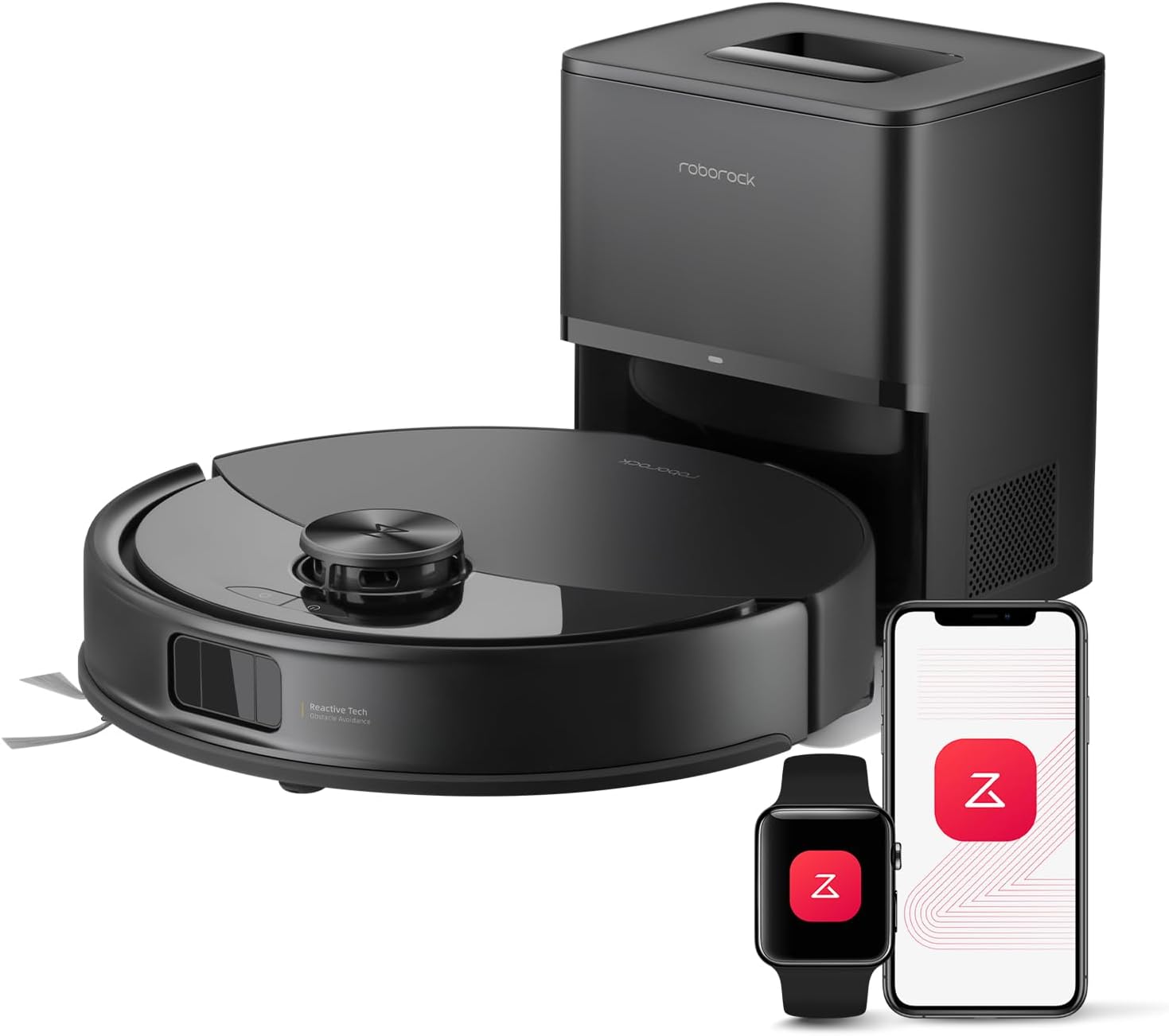
Roborock Q10 S5+ Review: A Powerful Robot Vacuum and Mop for Automated Home Cleaning
Affiliate Disclosure: As an Amazon Associate I earn from qualifying purchases.
Keeping floors clean can become a repetitive and time-consuming task, especially in homes with pets, carpets, children, or multiple floor types. The Roborock Q10 S5+ is designed to reduce that workload by combining strong vacuuming, sonic mopping, intelligent navigation, obstacle avoidance, and automatic dust disposal in one cleaning system.
The Q10 S5+ belongs to Roborock’s Q10 Series and is positioned as an upgraded robot vacuum and mop for households that want more automation without moving to a large multifunction dock. Its self-emptying station can collect debris from the robot after cleaning, while the robot handles everyday vacuuming and mopping through customizable schedules and room-based cleaning plans.
This Roborock Q10 S5+ review examines its cleaning technology, navigation, mopping performance, app features, maintenance requirements, advantages, and limitations. The goal is to help you decide whether its combination of features is suitable for your home.
Roborock Q10 S5+ Overview
The Roborock Q10 S5+ is a robot vacuum and mop equipped with a RockDock Plus self-emptying station. It uses 10,000Pa HyperForce suction, PreciSense LiDAR navigation, ReactiveTech obstacle avoidance, a dual anti-tangle brush system, and the VibraRise 2.0 sonic mopping system.
Unlike basic robot vacuums that rely on random movement, the Q10 S5+ creates a detailed map of the home and plans organized cleaning routes. Through the Roborock app, users can choose specific rooms, create cleaning schedules, adjust suction and water settings, establish restricted areas, and manage maps for multiple floors.
The self-emptying dock is one of the most important differences between the Q10 S5+ and the standard Q10 S5. After the robot returns to the dock, collected dust and debris are transferred from the robot’s internal dustbin into a larger disposable dust bag.
Key Features
The main features of the Roborock Q10 S5+ include:
- 10,000Pa HyperForce suction
- RockDock Plus automatic dust-emptying station
- Large 2.7-liter dock dust bag
- Up to 70 days of self-emptying capacity under suitable conditions
- VibraRise 2.0 sonic mopping system
- Mop vibration frequency of up to 3,000 times per minute
- Automatic mop lifting
- Dual anti-tangle main and side brushes
- ReactiveTech obstacle avoidance
- PreciSense LiDAR navigation
- Ultrasonic carpet detection
- Multi-level mapping
- Custom room, zone, and schedule cleaning
- No-go zones and virtual boundaries
- Roborock app control
- Voice control compatibility
- Automatic suction boost on carpets
- Off-peak charging options
Actual cleaning intervals and dust-bag replacement frequency will depend on the size of the home, cleaning schedule, floor conditions, and amount of hair or debris collected.
10,000Pa HyperForce Suction
One of the Q10 S5+’s most notable specifications is its 10,000Pa HyperForce suction. This level of suction is designed to collect common household debris such as crumbs, dust, loose dirt, cereal pieces, pet hair, and particles trapped between floorboards.
High suction can be particularly useful on carpets, where debris may settle below the visible surface. When the robot detects carpet, it can automatically increase suction power to improve debris removal. Users can also select different suction settings through the app depending on the room and cleaning situation.
Maximum suction will generally create more noise and consume battery power more quickly than lower modes. For routine cleaning on hard floors, a balanced or moderate setting may be sufficient. Stronger settings can then be reserved for rugs, carpets, entryways, and heavily used rooms.
It is also important to remember that suction power is only one part of cleaning performance. Brush design, navigation, floor contact, cleaning frequency, and room layout also influence how effectively a robot vacuum collects debris.
Dual Anti-Tangle Brush System
Hair becoming wrapped around a robot vacuum’s brushes is a common maintenance problem. The Q10 S5+ addresses this with a dual anti-tangle system consisting of a JawScrapers Comb main brush and a specially designed anti-tangle side brush.
The main brush collects dirt from the cleaning path and directs it toward the suction inlet. Its comb-style design is intended to reduce the amount of hair that wraps around the roller. The side brush moves debris away from walls, furniture edges, and corners so the robot can collect it.
This design may be especially helpful in homes with long-haired residents or pets that shed frequently. However, anti-tangle technology does not mean that brush maintenance is completely unnecessary. Hair, thread, and fibers can still collect around brush ends, wheels, or moving parts.
Periodic inspection remains recommended. The advantage is that users may spend less time cutting tightly wrapped hair from the brushes compared with robots that use more conventional brush designs.
VibraRise 2.0 Sonic Mopping
The Q10 S5+ does more than drag a damp cloth across the floor. Its VibraRise 2.0 system uses an actively vibrating mop module that can operate at up to 3,000 movements per minute.
These rapid movements help create scrubbing action against the floor, making the system better suited to dried marks and light stains than passive mopping pads. Through the app, users can adjust water flow and choose more intensive mopping options for areas that need additional attention.
The system is suitable for regular maintenance cleaning on sealed hard floors, including tile and compatible finished flooring. It can help manage footprints, light kitchen residue, surface dust, and everyday marks.
However, it should not be viewed as a complete replacement for manual deep cleaning in every situation. Thick spills, grease, heavily dried stains, and textured grout may still require direct cleaning. The mop pad must also be washed regularly because this dock empties dust but does not automatically wash or dry the mop.
Automatic Mop Lifting and Carpet Detection
The Q10 S5+ uses ultrasonic carpet detection to identify carpeted areas. When carpet is detected, the mop module can lift by approximately 8 millimeters, helping reduce contact between the wet mop and carpet surfaces.
This allows the robot to vacuum hard floors and suitable low-pile carpets during the same cleaning session without requiring the mop attachment to be removed every time the floor type changes.
Automatic mop lifting is convenient, but the amount of clearance is limited. Homes with thick, high-pile, or moisture-sensitive rugs may benefit from using no-mop zones in the app. This prevents the robot from entering selected carpeted areas while the mop is installed.
Users can also customize carpet behavior, including automatic suction boost and restricted-area settings. Taking time to configure these options during setup can produce more reliable results in homes with mixed flooring.
Self-Emptying RockDock Plus
The RockDock Plus is a major reason to choose the Q10 S5+ instead of a model that only includes a charging base. When the robot finishes cleaning, the dock automatically pulls debris from the onboard dustbin into its larger dust bag.
The dock uses a 2.7-liter bag that may provide up to 70 days of dust collection under the manufacturer’s stated conditions. The actual interval will vary considerably. A home with several shedding pets may fill the bag much faster than a small home with mostly hard floors and limited debris.
Automatic emptying reduces the need to handle dust after every cleaning session. This is particularly useful for people who schedule the robot to run daily or several times per week.
The dock still requires maintenance. The dust bag must eventually be replaced, the air path should be checked for blockages, and the dock area should remain clear. Automatic emptying can also be noticeably louder than routine vacuuming, although the emptying cycle normally lasts for a relatively short period.
LiDAR Navigation and Mapping
The Q10 S5+ uses PreciSense LiDAR navigation to scan its surroundings, create maps, and plan systematic cleaning routes. LiDAR allows the robot to understand room boundaries and furniture placement instead of moving around the home randomly.
After creating a map, the robot can divide the home into rooms. Users can rename rooms, adjust boundaries, select particular areas, and create room-specific cleaning instructions.
For example, the kitchen can be assigned stronger suction and more intensive mopping, while a bedroom can use quieter settings. You can also clean a temporary zone without starting a complete home-cleaning cycle.
Multi-level mapping makes the robot more practical for houses with more than one floor. The robot can store separate maps, although it must still be carried manually between floors if there is no dock on each level.
ReactiveTech Obstacle Avoidance
The ReactiveTech system is designed to detect and navigate around objects in the robot’s path. This can reduce collisions and help the robot operate in rooms containing furniture, shoes, toys, or other common obstacles.
Obstacle avoidance is useful, but it should not be treated as a guarantee that every small item will be detected. Thin cables, lightweight objects, socks, and very low items may still create problems.
Preparing the floor before cleaning remains a good practice. Removing charging cables, clothing, fragile decorations, and small toys can reduce interruptions and protect both the robot and household items.
The combination of LiDAR mapping and ReactiveTech avoidance helps the robot clean efficiently while responding to objects that may not have appeared on its original map.
Roborock App and Smart Controls
The Roborock app provides access to most of the Q10 S5+’s advanced features. Users can view maps, select rooms, adjust cleaning settings, monitor progress, create schedules, and define restricted areas.
Useful app functions include:
- Room-specific cleaning
- Zone cleaning
- Multiple cleaning passes
- Adjustable suction power
- Adjustable water flow
- Carpet boost
- No-go zones
- No-mop zones
- Virtual walls
- Multi-floor maps
- Cleaning history
- Temporary cleaning
- Dock emptying controls
- Off-peak charging
- Customized routines
The robot also supports compatible voice assistants, allowing users to start or manage basic cleaning commands through voice control. App setup requires a suitable Wi-Fi connection, and some advanced functions may take time to configure correctly.
Maintenance Requirements
The Q10 S5+ reduces manual cleaning work, but it is not maintenance-free. The mop pad should be washed after mopping sessions and allowed to dry properly. The water tank should be emptied when the robot will not be used for an extended period.
The main brush, side brush, wheels, sensors, and filter should be inspected regularly. Dust or hair around moving parts can reduce performance. The dock’s disposable dust bag must also be replaced when full.
Replacement parts create an ongoing ownership cost, so buyers should consider the future availability of dust bags, filters, mop pads, and brushes. Following the maintenance schedule in the product manual can help preserve cleaning performance and reduce avoidable problems.
Advantages
The Roborock Q10 S5+ offers several practical benefits:
- Strong suction for carpets and hard floors
- Automatic dust disposal
- Active sonic mopping
- Automatic mop lifting
- Organized LiDAR navigation
- Detailed room and zone controls
- Reduced brush tangling
- Multi-level mapping
- Carpet detection and suction boost
- Convenient scheduling
- Useful obstacle avoidance
- Suitable features for homes with pet hair
Its combination of vacuuming, mopping, navigation, and self-emptying can significantly reduce the amount of daily floor-cleaning work.
Potential Limitations
There are also some limitations to consider:
- The dock does not automatically wash or dry the mop
- Disposable dust bags require periodic replacement
- Mop pads still need manual cleaning
- Self-emptying can be loud
- Obstacle avoidance may not detect every small object
- Thick carpets may require customized no-mop zones
- The dock needs additional floor space
- Advanced app settings may require an initial learning period
- Heavy stains may still need manual scrubbing
These limitations do not make the Q10 S5+ ineffective, but they help establish realistic expectations about its level of automation.
Who Should Consider the Roborock Q10 S5+?
The Q10 S5+ may be a suitable choice for busy households that want frequent automated cleaning with less dustbin handling. It is particularly relevant for homes with pets, mixed flooring, several rooms, or regular dust and debris accumulation.
It may also appeal to users who value detailed app customization and accurate mapping. Room-specific schedules can help maintain busy areas such as kitchens, dining rooms, and entryways without cleaning the entire home every time.
Buyers seeking a dock that also washes, refills, and dries the mop may prefer a more advanced multifunction docking system. Those who only need basic vacuuming may not use all of the Q10 S5+’s mopping and mapping features.
Final Verdict
The Roborock Q10 S5+ combines powerful suction, sonic mopping, intelligent navigation, anti-tangle brushes, carpet detection, obstacle avoidance, and automatic dust emptying in a well-rounded cleaning system.
Its strongest advantages are everyday convenience and customization. The RockDock Plus reduces routine dustbin emptying, while LiDAR mapping and the Roborock app allow users to control where, when, and how the robot cleans.
The VibraRise 2.0 system adds more effective floor maintenance than a simple passive mop, although users must still wash and dry the mop pad manually. Similarly, obstacle avoidance and anti-tangle brushes reduce maintenance demands without eliminating them completely.
For households looking for a robot vacuum and mop that can manage regular cleaning across carpets and hard floors while minimizing day-to-day intervention, the Roborock Q10 S5+ presents a capable and feature-rich option. Before purchasing, confirm the exact model, included accessories, warranty details, and current product information on the retailer’s page.